
In today’s digital environment, computers are expected to handle demanding tasks such as software development, gaming, content creation, and multitasking across multiple applications. However, many users experience slow system performance even when their computers have capable hardware. Applications compete for CPU power, memory, and system resources, which often results in reduced efficiency and frustrating slowdowns.
It is at this point that software to speed things up is really needed. Rather than changing the hardware or changing system settings by hand, the new software programs that are available are able to deal with system resources in a clever way, so that the programs you are using most get the best chance to work.
If you want to improve your computer’s responsiveness and eliminate slowdowns, this guide explains how performance boosting software like TurboCharger transforms system efficiency.
Why Performance Boosting Software Is Essential Today
Present-day computers deal with a lot going on in the background, many processes are running all the time. Things like operating system functions, program updates, apps that are running but you aren’t using, browser windows, and protection from viruses are all examples. Though these are all needed, they also use up a good deal of the computer’s processing speed and memory.
This becomes an issue as these tasks in the background start to interfere with the programs you’re trying to work with.
This leads to several common problems:
- Slower application launch times
- Reduced responsiveness when switching between programs
- Lag during demanding tasks such as gaming or editing
- Increased CPU and memory consumption from background applications
Software to improve performance fixes the problems by cleverly giving out the system’s parts again.
Because of correctly ordering what programs matter and wisely ordering what resources matter, apps which are important get the computer strength they require, and processes which aren’t as important are handled by themselves.
What Is Performance Boosting Software?
Software which is intended to boost performance that is, system optimisation tools works by changing the way computer operating systems hand out the system’s resources, so as to make the computer run more quickly.
Rather than letting Windows give all programs equal shares of processing power and memory, this kind of software works out which applications you need the most, and makes certain those get the first and best use of the system’s resources.
Key functions of performance boosting software include:
- Intelligent CPU resource allocation
- Efficient memory management
- Background process control
- Automatic Windows optimization
- Dynamic app prioritization
What this technology aims to do is straightforward to make certain the programs you use get the speed they should, and cut down on the amount of system resources lost to things running in the background that aren’t needed.
TurboCharger builds on this idea, giving you automatic tuning of your system which happens all the time and doesn’t ask you to do anything yourself.
The Limitations of Traditional PC Optimization Methods
Many users attempt to improve their computer’s performance through manual optimization methods. While these methods can help in some situations, they often require technical knowledge and constant adjustments.
Common traditional optimization methods include:
- Closing background applications manually
- Adjusting process priorities through Task Manager
- Disabling startup applications
- Editing system configuration settings
- Upgrading hardware components
Doing things by hand like this takes a lot of people’s time and isn’t easy. And, it doesn’t give you ongoing improvement because the way your system is doing things is always shifting as programs begin and end.
Adjusting by hand doesn’t have the smarts to respond to what your computer is actually doing, as needs change. Because of that, people are more and more using programs which can watch what the system is up to and change how it gives out resources, whilst it’s running.
How TurboCharger Improves Windows Optimization
TurboCharger was made to get better Windows performance, through the clever handling of what your computer’s got.
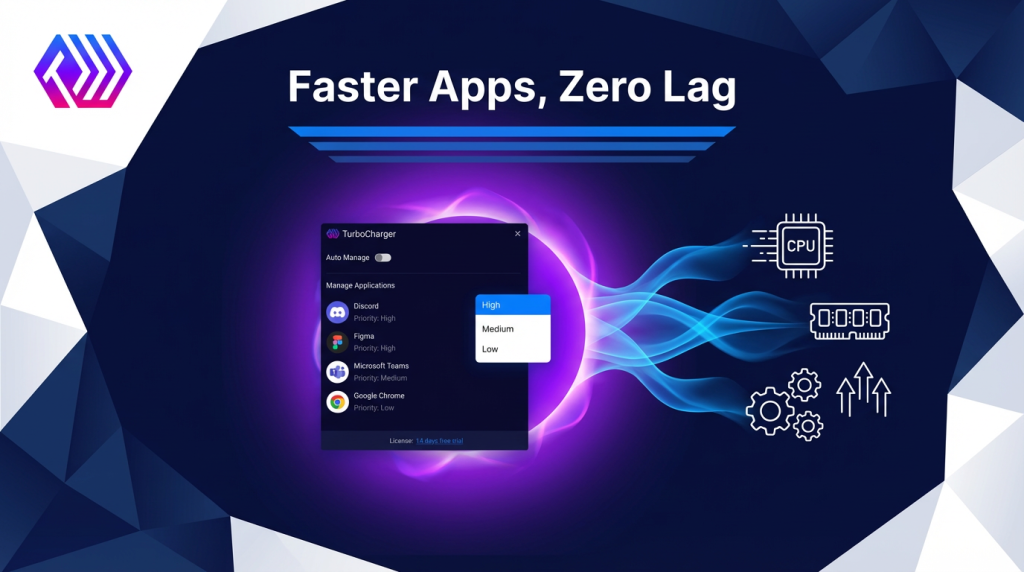
Not like the usual optimisation programs needing you to set things up by hand, TurboCharger keeps an eye on what your system is doing and gives the resources to whichever programs are most important, by itself.
This way, programs you need to go quickly do, and things in the background don’t cause trouble.
Key advantages of TurboCharger include:
- Automatic smart resource prioritization
- Real-time system performance optimization
- Intelligent app prioritization
- Minimal system overhead
- Continuous system monitoring
By automating resource allocation, TurboCharger ensures that your computer maintains fast performance even during heavy workloads.

Smart Resource Prioritization Explained
One of the most powerful features of TurboCharger is smart resource prioritization.
How TurboCharger Analyzes and Allocates System Resources
The technology works by looking at what applications are open and deciding which ones need to run as quickly as possible. The program then changes how the processor and memory are used, giving those applications the biggest share.
Automatic Prioritization for Demanding Applications
If, say, you’ve got something like a program for coding, a video editor, or a game going something that uses a lot of resources TurboCharger will, without you doing anything, make that application the most important.
App Prioritization for Maximum Efficiency
Another important feature of TurboCharger is advanced app prioritization.
Different applications don’t all need to perform at the same speed. A few things like system tools or tasks that work in the background, will do just fine using very few of your computer’s abilities. However, some programs absolutely must have a lot of processing strength to work as they should.
TurboCharger looks at what applications are doing and then on its own figures out which ones need to be first in line for the system’s abilities.
This process ensures that:
- Critical applications run smoothly
- Background tasks remain controlled
- System responsiveness remains high
- Performance bottlenecks are reduced
Through automated app prioritization, TurboCharger creates a balanced system environment that maximizes productivity.
Real-World Benefits of Performance Boosting Software
Users who implement performance boosting software like TurboCharger often experience noticeable improvements in system performance.
- Faster Application Performance
Programs launch faster and run more smoothly because they receive adequate system resources.
- Improved Multitasking
Users can run multiple applications simultaneously without experiencing slowdowns.
- Reduced System Lag
Smart resource management prevents performance bottlenecks caused by background tasks.
- Enhanced Productivity
Professionals working with demanding software tools can maintain consistent system performance.
- Optimized Gaming and Creative Workflows
High-performance tasks such as gaming, video editing, and development benefit significantly from improved resource allocation.
Who Should Use TurboCharger?
TurboCharger is designed for a wide range of users who rely on their computers for demanding tasks.
- Developers:
Because developers typically use several tools, compilers, and virtual machines at the same time, TurboCharger makes certain those programs get the best possible speed.
- Designers:
Those in video editing, design, and photography depend on powerful programs and intelligent allocation of system resources makes their work go more quickly.
- Professionals:
People in offices who deal with big data, slideshows, or who do a lot of tasks at once, will find their computers work quicker and with less trouble.
- Gaming:
Stable performance is vital in gaming, and TurboCharger assists in giving games first call on a computer’s resources.
- Everday Users:
All computer owners, even the ones who only do basic tasks, can get a boost from a program which improves how a computer runs without any input from the user.
Why TurboCharger Is the Future of PC Optimization
Because computers are now doing more and more difficult jobs, the older ways of making them run at their best aren’t working as well. People need smart programs which can change with what the computer is doing at the moment, and then by themselves make the system work as efficiently as it can.
TurboCharger is the newest type of program to speed up performance, it puts together automatic operation, clever looking-at-what’s-happening, and making the system as good as it can be while it’s running.
Instead of depending on someone changing things by hand, TurboCharger constantly adjusts to how the system is, to keep performance steady.
Conclusion:
Today’s computers need to deal with resources well if they’re to keep running quickly. As a lot of programs use the processor and memory at the same time, even very good machines can get slow if things aren’t set up properly. Software to give performance a lift is a good way to fix this; it looks after a computer’s resources in a clever way, and gives the most important programs first place.
TurboCharger is a strong program for making a PC faster – it makes Windows work as well as it can, lets resources be given priority in a smart way, and always gives speed. Because it manages resources by itself and makes programs run better, TurboCharger will help people get rid of slowness, work more, and keep a computer that reacts well. Anyone wanting to make a PC run quicker and to have a system which is more efficient will find TurboCharger is a new and dependable answer.