
Boosting Your PC’s Performance Unleashed

These days, with everything happening so quickly on computers, getting your PC to run at its best is really important for work and fun. If you’re really into gaming, doing complicated work, or even just using a lot of programs at once, your computer has to be able to handle it all. TurboCharger is intended to get the most out of your computer by smartly controlling the CPU and memory, so you’ll have a smooth experience with no delays. This article will explain how TurboCharger, as well as similar programs for making your computer better, can improve how quickly and reliably your computer runs, meaning your computer will be as efficient as possible.

Understanding PC Optimization Software

When it comes to making your computer better, programs like Microsoft’s PC Manager and AVG TuneUp are top choices for speeding things up. They’re really good at getting rid of unnecessary files, adjusting settings and looking after all of your computer’s “stuff”.

Microsoft’s PC Manager works easily with Windows, so cleaning up your system feels natural. It’s especially good at deleting those files your computer only used briefly and is clever about what programs launch when you turn on your computer, freeing up the computer to do other things. All of this makes your computer work as it should, with as little slowing down as possible.

Boost Efficiency and Performance with AVG TuneUp’s Advanced Features

AVG TuneUp is also well known for being a complete collection of tools to get a new lease on life for your computer. It gets rid of useless files and puts the bits and pieces on your hard drive back in order, which makes the system much cleaner. What’s more, it will automatically change settings to use less power and make the processor work more efficiently, and this makes everything you do on the computer each day work better.

These two programs that speed up your computer both keep a careful watch on how quickly your system is running and are always trying to improve it. By cleaning things up and carefully adjusting the system, they provide a solid base for your computer, so it’s ready for tough things like computer games. If you want your computer to run more smoothly in general, these programs are really important to have.

Unleashing Gaming Potential with FPS Boosters

If you want your game to run better, software to improve your frame rate is really important. Players who want gameplay that’s really absorbing and without stopping or slowing down need these tools. They improve how many frames per second your game gets, making quick action much smoother, and they do this by changing the graphics settings – for instance, the sharpness of shadows, how detailed textures are, and how far you can see.

What’s more, these optimizers for gaming frame rates usually cut down on lag by helping your game and your computer work together more efficiently. This decreased delay is incredibly important when you are competing and need to respond quickly. And, they speed up how the graphics are created on the screen, so even the most demanding visual parts of a game happen without pausing or being interrupted.

Elevate Your Gaming Experience with Top FPS Boosters

Razer Cortex, MSI Afterburner and NVIDIA GeForce Experience are all popular options and each does something specific for all types of gamers, from those who play for fun to the very dedicated. Razer Cortex will stop unneeded programs running in the background to give your computer more power. MSI Afterburner is about getting more from your graphics card by letting you to increase its speed. GeForce Experience, on the other hand, is great at easily updating your graphics drivers and adjusting your game settings with just a single simple process.

Using an FPS booster generally makes a big difference to how your games play, changing slow and frustrating gameplay into something fast and exciting, for relaxed games or intense online battles.

Enhancing System Performance and Efficiency

The way computers handle what you ask of them, both normal things and really demanding games, is hugely changed by software that improves system performance. These programs smartly share the work that needs doing across all the parts of your computer’s brain (the CPUs) so things don’t get stuck, and everything keeps responding to you. Because of this, your CPU won’t be pushed too hard by programs that use a lot of power, and your gaming or doing multiple things at once will be smooth.

What’s more, application optimization cleans up the basic instructions for programs, allowing them to run quicker and be more efficient. By getting the directions to the processor just right, these changes mean things happen faster with less effort, reducing delays and speeding things up. Faster caching, which prioritizes easy access to things you use all the time, is another trick, lowering how long it takes to find data and giving you a distinctly faster experience with the visuals of your computer.

Achieving Optimal Performance: Speed, Resources, and Stability in Harmony

Getting the right mix of making things go faster and controlling what they use is still really important. Pushing for speed too much could actually make your system less likely to work, or make it use up a lot more power and storage, which would slow things down in the long run. So, choose programs that cleverly balance speed, how much they use of your system’s capabilities, and how solid they are. That way, people get a quick response from the system, it will still be there for them, and you’ll have a strong and lasting setup.

Optimizing Computer Speed with Speedup Tools

These days, programs that optimize your computer are a great way to get everything you can out of it, by speeding up how your processor works and adjusting your hardware to work more effectively. This helps with really intense gaming and with just what you do every day. Lots of the best of these programs make starting up your computer easier. They get rid of how long you have to wait for it to load because of all the applications trying to begin when the computer does. CCleaner, a really good one, is good at clearing up what happens at startup, so your computer starts up quickly without anything getting in the way.

What’s just as important is managing the apps running in the background, which use up your resources without you even realizing. Razer Cortex, for instance, is brilliant at smartly stopping programs that aren’t essential, so your computer can use more of its strength on the things you are doing. This makes your computer feel much quicker to respond and improves how well it runs in general.

Streamline Your System: How Memory Management Improves Performance

Good memory handling is really important too. Programs like the free version of Advanced SystemCare find and release RAM that’s being used by programs you aren’t actively doing anything with, so things don’t slow down and you can switch between lots of tasks easily. Using your RAM in the best way means less of that delay you get when you have a bunch of programs open at once. All these types of programs to speed up your computer can save you precious seconds when you start up, and give you a smooth, speedy experience.

Game Performance Optimization Techniques

If you want your gaming to be as good as it possibly can be, you really need to understand how to seriously improve how well your games run. Gamers can get more from their computers than they were originally designed for by making the CPU and graphics card work faster by changing their clock speeds. This is a careful thing to do, usually using programs like MSI Afterburner, but it can really raise the number of frames per second and make your whole system work more efficiently.

And, crucially, you should also keep your graphics drivers up to date. Having the newest graphics software installed means it will work with new games and it’s less likely to break. NVIDIA GeForce Experience and AMD Radeon Software are programs that make getting these vital updates simple.

Overclocking and Keeping Your Drivers Updated

If you want your gaming to be as good as it possibly can be, you really need to understand how to seriously improve how well your games run. Gamers can get more from their computers than they were originally designed for by making the CPU and graphics card work faster by changing their clock speeds. This is a careful thing to do, usually using programs like MSI Afterburner, but it can really raise the number of frames per second and make your whole system work more efficiently.

And, crucially, you should also keep your graphics drivers up to date. Having the newest graphics software installed means it will work with new games and it’s less likely to break. NVIDIA GeForce Experience and AMD Radeon Software are programs that make getting these vital updates simple.

Future of Performance Tuning Software

As technology keeps moving forward, software to make your computer run better is about to get some amazingly new features. A really important one is using artificial intelligence to optimize how your computer performs. These smart programs look at what’s happening with your data and make changes to improve speed with a lot more precision than methods we’ve used before, and they could totally change how we get more out of our PCs. AI will provide a more individual, and importantly, a more successful improvement by adjusting things to how you use your computer.

Also, a huge improvement will be in software that watches your system while it’s running. Being able to follow and fix problems with performance as they happen will be critical as programs get more complex. This gives you a quick response, allowing for changes to happen immediately to maintain the best speed possible, all without you having to do anything yourself.

Cloud-Powered Performance for Enhanced Efficiency

Things are changing completely in the world of getting the best performance from your computer because hardware tuning and improving performance with the cloud are now working together. By using huge amounts of information and incredibly powerful computers, linking with the cloud provides ways to tune performance that can grow as needed and will continue to work even if something fails. This combination allows for updates to happen without a problem and keeps your systems at their best with the very latest improvements.

All of these developments will substantially change how we make PCs and gaming systems run more efficiently. We’re moving to solutions that are more intelligent, adjust to what’s happening, and cover everything, and they’ll offer levels of tweaking and performance gains that have never been available before.

Conclusions

Utilizing PC optimization utilities plays a crucial role in preserving system health and securing top-tier performance for both gaming and daily tasks. These tools provide notable advancements, ranging from lowering lag and boosting graphics quality to managing resources efficiently. By investing in such technologies, you not only see immediate operational performance gains but also significantly enhance system lifespan and usability.

Performance Boosting Software: How TurboCharger Speeds Up Your PC

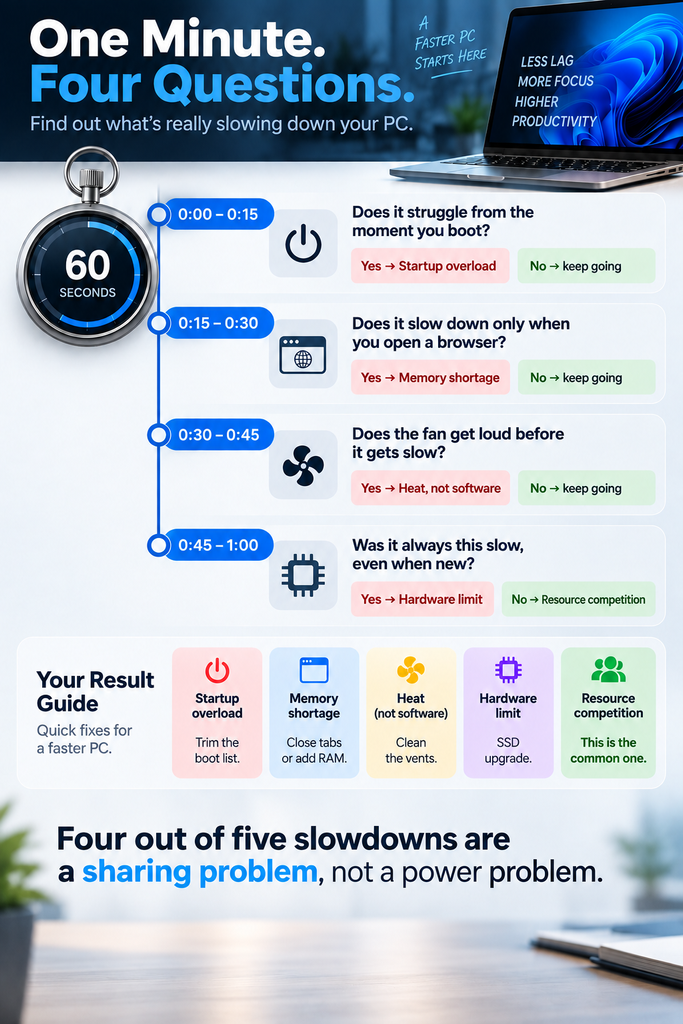
In today’s digital environment, computers are expected to handle demanding tasks such as software development, gaming, content creation, and multitasking across multiple applications. However, many users experience slow system performance even when their computers have capable hardware. Applications compete for CPU power, memory, and system resources, which often results in reduced efficiency and frustrating slowdowns.

It is at this point that software to speed things up is really needed. Rather than changing the hardware or changing system settings by hand, the new software programs that are available are able to deal with system resources in a clever way, so that the programs you are using most get the best chance to work.

If you want to improve your computer’s responsiveness and eliminate slowdowns, this guide explains how performance boosting software like TurboCharger transforms system efficiency.

Why Performance Boosting Software Is Essential Today

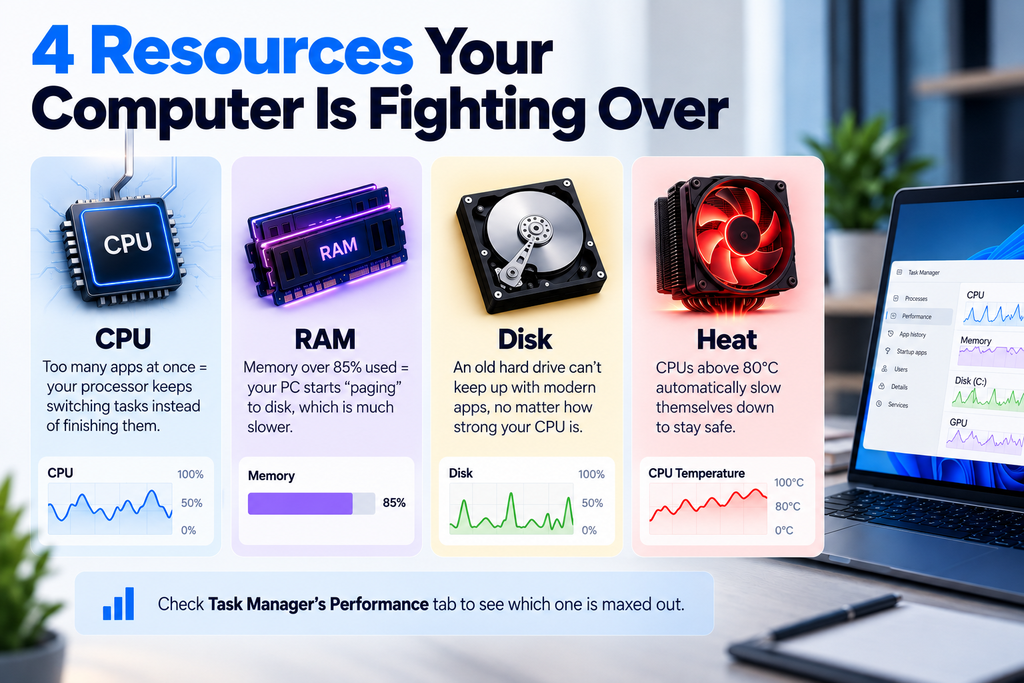
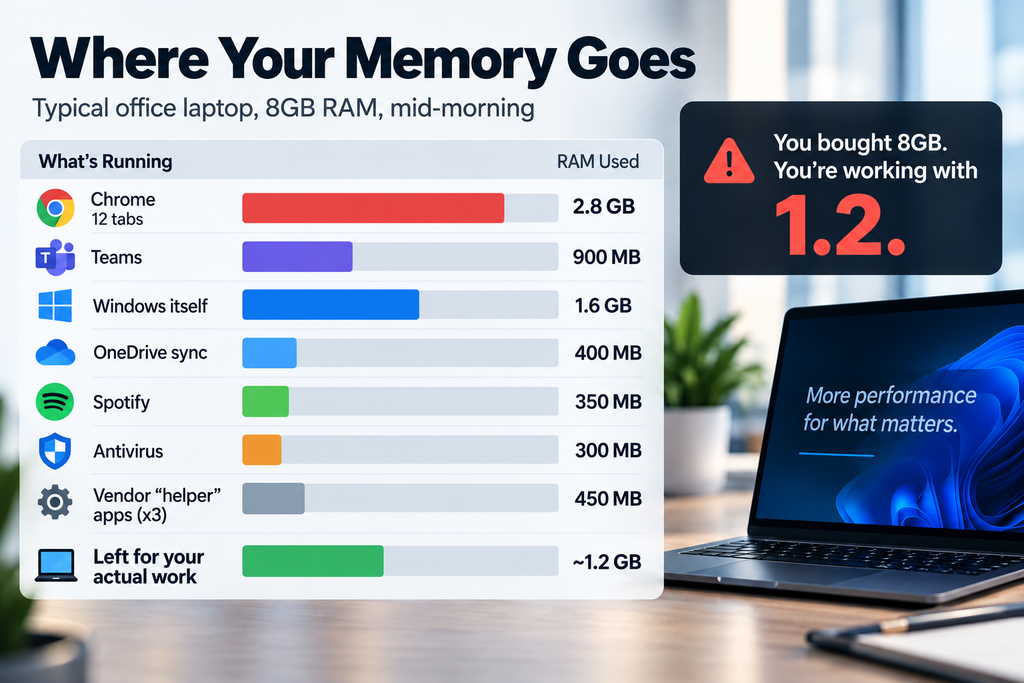
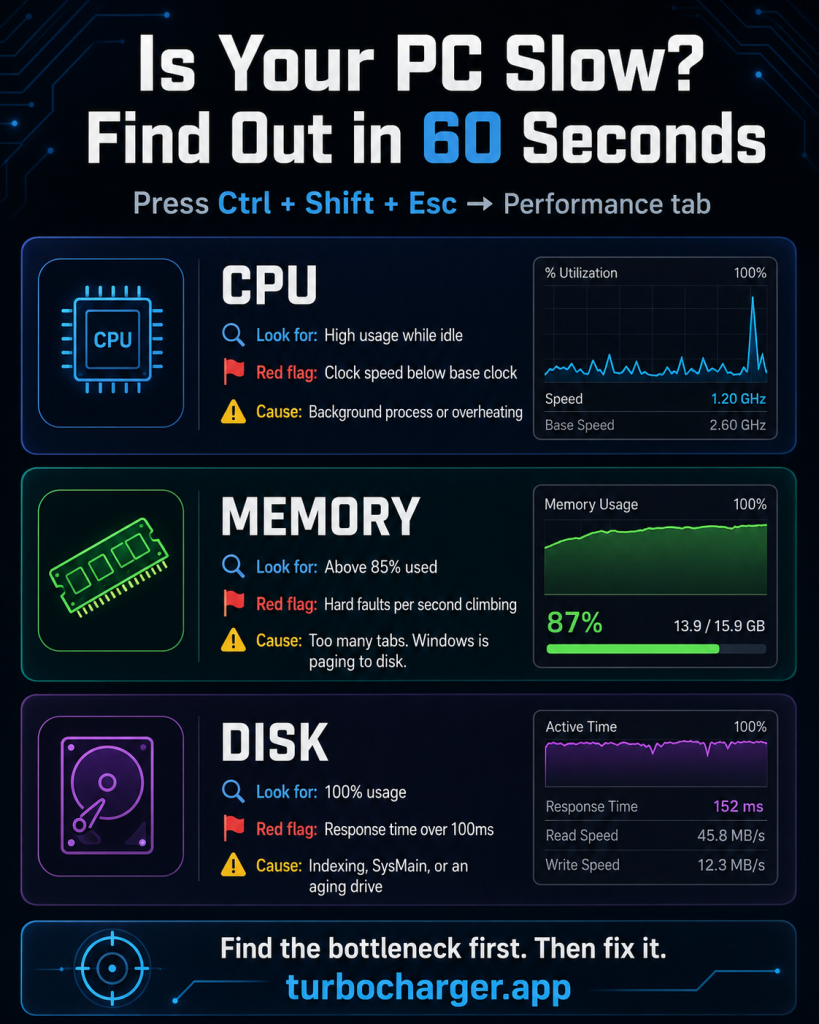
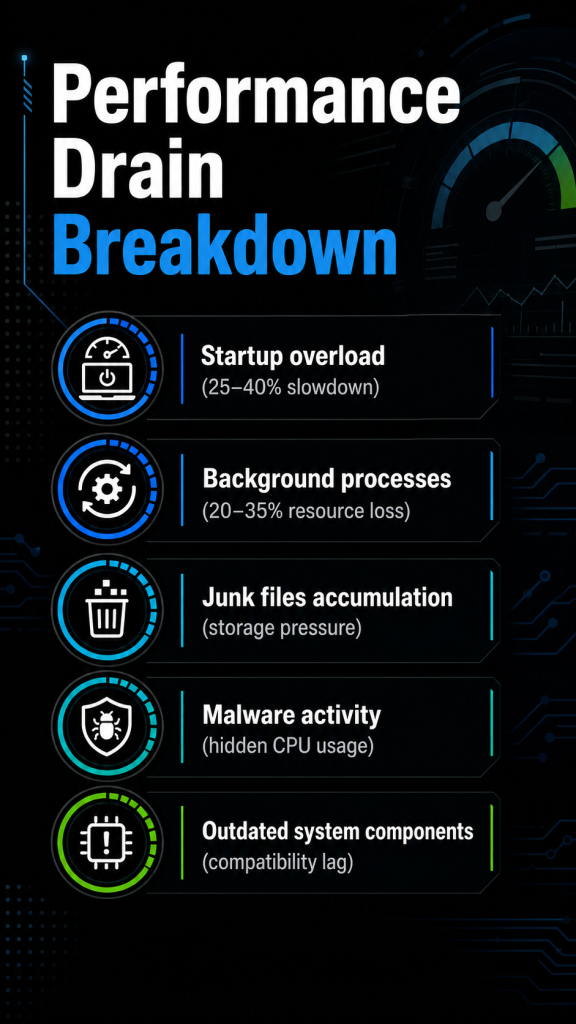
Present-day computers deal with a lot going on in the background, many processes are running all the time. Things like operating system functions, program updates, apps that are running but you aren’t using, browser windows, and protection from viruses are all examples. Though these are all needed, they also use up a good deal of the computer’s processing speed and memory.

This becomes an issue as these tasks in the background start to interfere with the programs you’re trying to work with.

This leads to several common problems:

  • Slower application launch times
  • Reduced responsiveness when switching between programs
  • Lag during demanding tasks such as gaming or editing
  • Increased CPU and memory consumption from background applications

Software to improve performance fixes the problems by cleverly giving out the system’s parts again.

Because of correctly ordering what programs matter and wisely ordering what resources matter, apps which are important get the computer strength they require, and processes which aren’t as important are handled by themselves.

What Is Performance Boosting Software?

Software which is intended to boost performance that is, system optimisation tools works by changing the way computer operating systems hand out the system’s resources, so as to make the computer run more quickly.

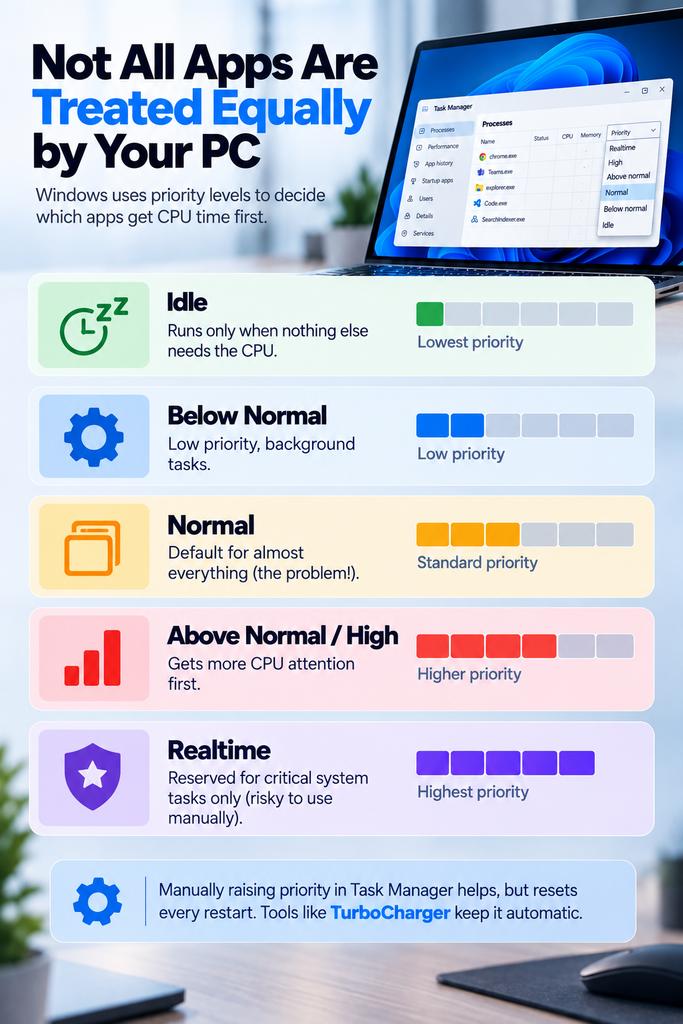
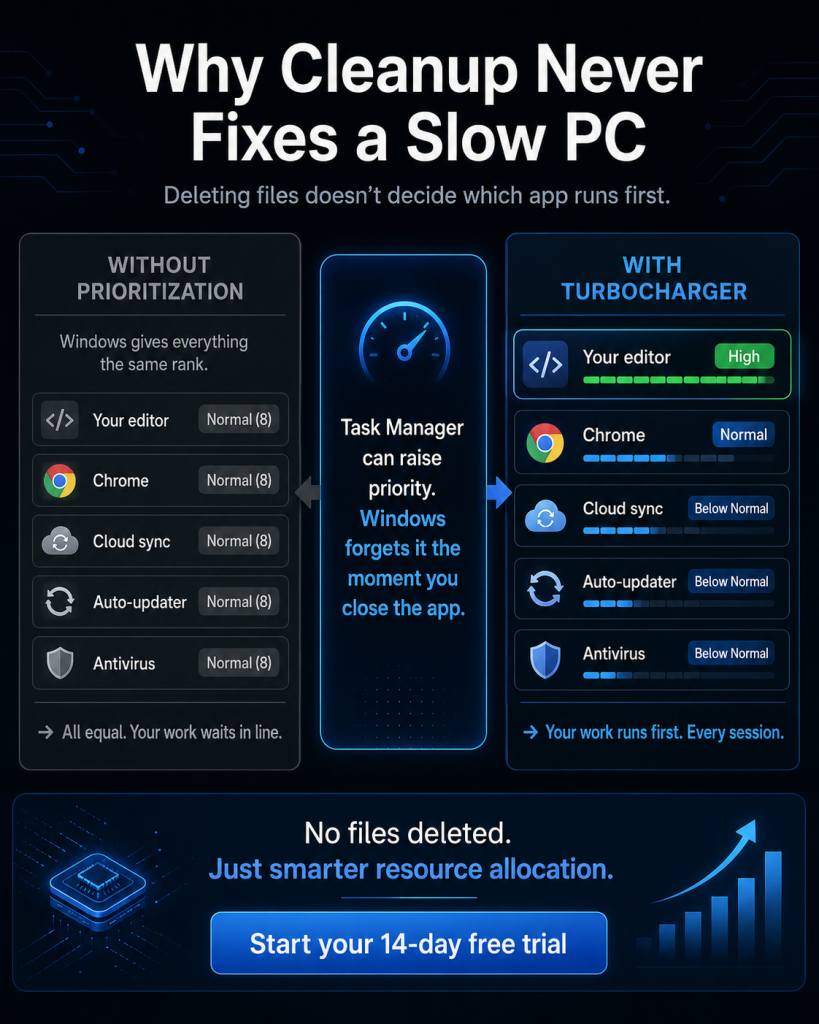
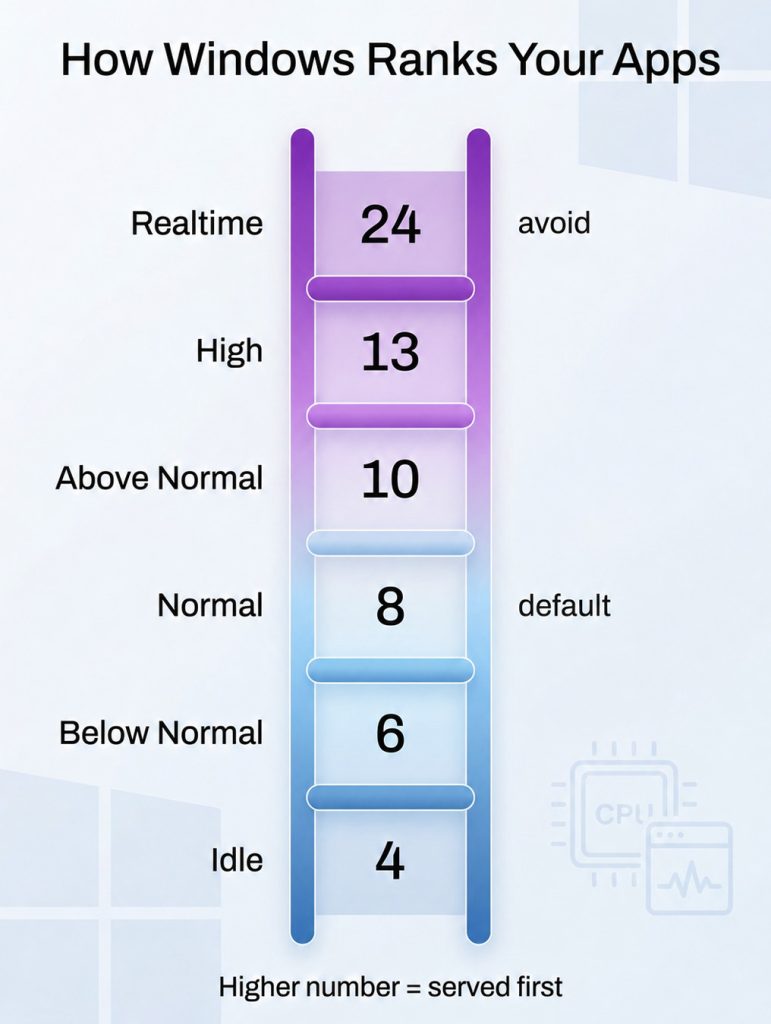
Rather than letting Windows give all programs equal shares of processing power and memory, this kind of software works out which applications you need the most, and makes certain those get the first and best use of the system’s resources.

Key functions of performance boosting software include:

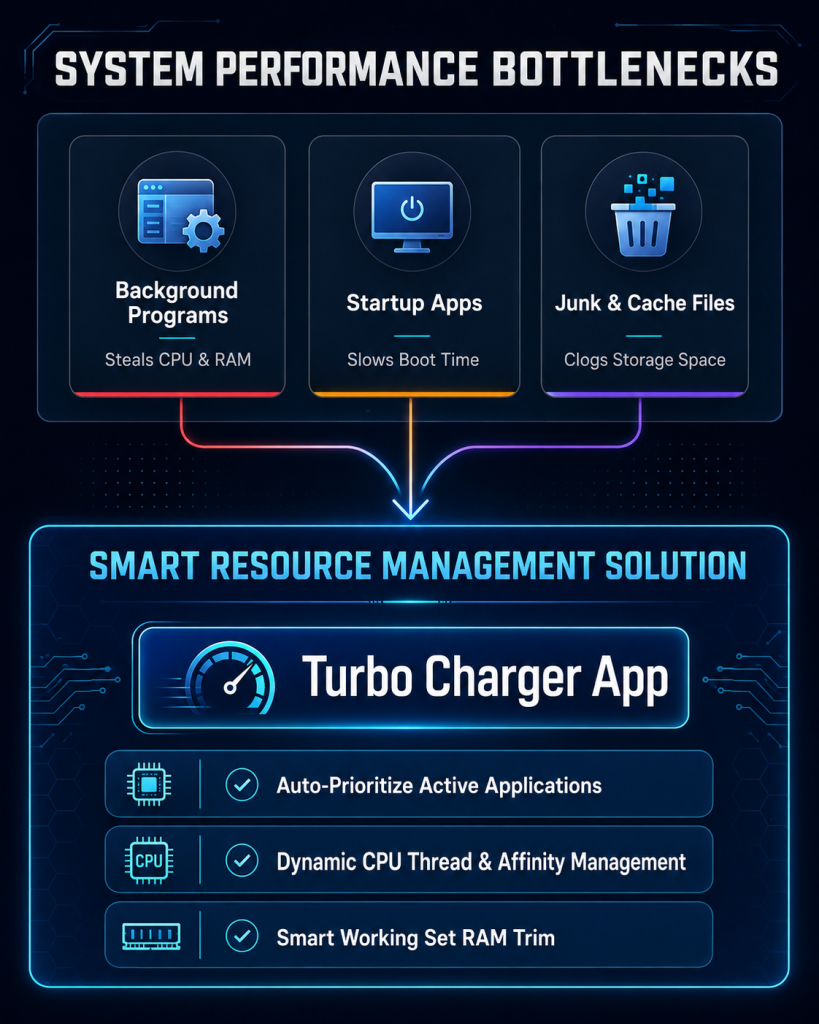
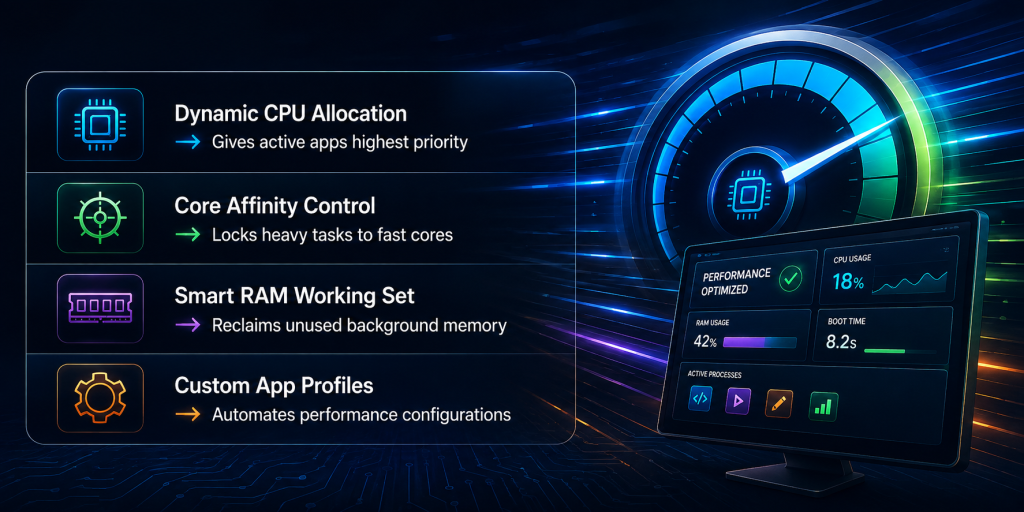
  • Intelligent CPU resource allocation
  • Efficient memory management
  • Background process control
  • Automatic Windows optimization
  • Dynamic app prioritization

What this technology aims to do is straightforward to make certain the programs you use get the speed they should, and cut down on the amount of system resources lost to things running in the background that aren’t needed.

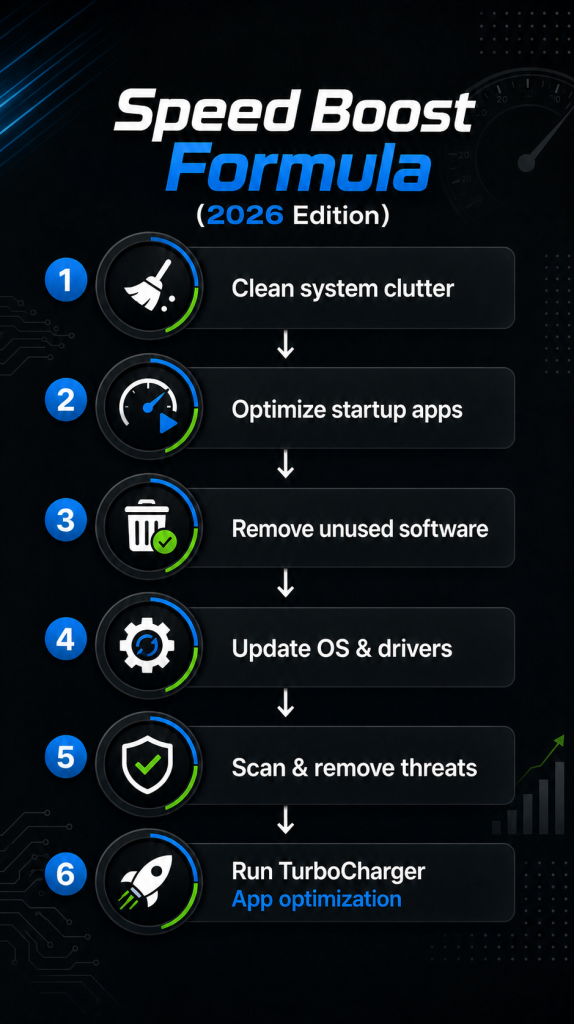
TurboCharger builds on this idea, giving you automatic tuning of your system which happens all the time and doesn’t ask you to do anything yourself.

The Limitations of Traditional PC Optimization Methods

Many users attempt to improve their computer’s performance through manual optimization methods. While these methods can help in some situations, they often require technical knowledge and constant adjustments.

Common traditional optimization methods include:

  • Closing background applications manually
  • Adjusting process priorities through Task Manager
  • Disabling startup applications
  • Editing system configuration settings
  • Upgrading hardware components

Doing things by hand like this takes a lot of people’s time and isn’t easy. And, it doesn’t give you ongoing improvement because the way your system is doing things is always shifting as programs begin and end.

Adjusting by hand doesn’t have the smarts to respond to what your computer is actually doing, as needs change. Because of that, people are more and more using programs which can watch what the system is up to and change how it gives out resources, whilst it’s running.

How TurboCharger Improves Windows Optimization

TurboCharger was made to get better Windows performance, through the clever handling of what your computer’s got.

Not like the usual optimisation programs needing you to set things up by hand, TurboCharger keeps an eye on what your system is doing and gives the resources to whichever programs are most important, by itself.

This way, programs you need to go quickly do, and things in the background don’t cause trouble.

Key advantages of TurboCharger include:

  • Automatic smart resource prioritization
  • Real-time system performance optimization
  • Intelligent app prioritization
  • Minimal system overhead
  • Continuous system monitoring

By automating resource allocation, TurboCharger ensures that your computer maintains fast performance even during heavy workloads.

Smart Resource Prioritization Explained

One of the most powerful features of TurboCharger is smart resource prioritization.

How TurboCharger Analyzes and Allocates System Resources

The technology works by looking at what applications are open and deciding which ones need to run as quickly as possible. The program then changes how the processor and memory are used, giving those applications the biggest share.

Automatic Prioritization for Demanding Applications

If, say, you’ve got something like a program for coding, a video editor, or a game going something that uses a lot of resources TurboCharger will, without you doing anything, make that application the most important.

App Prioritization for Maximum Efficiency

Another important feature of TurboCharger is advanced app prioritization.

Different applications don’t all need to perform at the same speed. A few things like system tools or tasks that work in the background, will do just fine using very few of your computer’s abilities. However, some programs absolutely must have a lot of processing strength to work as they should.

TurboCharger looks at what applications are doing and then on its own figures out which ones need to be first in line for the system’s abilities.

This process ensures that:

  • Critical applications run smoothly
  • Background tasks remain controlled
  • System responsiveness remains high
  • Performance bottlenecks are reduced

Through automated app prioritization, TurboCharger creates a balanced system environment that maximizes productivity.

Real-World Benefits of Performance Boosting Software

Users who implement performance boosting software like TurboCharger often experience noticeable improvements in system performance.

  • Faster Application Performance

Programs launch faster and run more smoothly because they receive adequate system resources.

  • Improved Multitasking

Users can run multiple applications simultaneously without experiencing slowdowns.

  • Reduced System Lag

Smart resource management prevents performance bottlenecks caused by background tasks.

  • Enhanced Productivity

Professionals working with demanding software tools can maintain consistent system performance.

  • Optimized Gaming and Creative Workflows

High-performance tasks such as gaming, video editing, and development benefit significantly from improved resource allocation.

Who Should Use TurboCharger?

TurboCharger is designed for a wide range of users who rely on their computers for demanding tasks.

  • Developers:

Because developers typically use several tools, compilers, and virtual machines at the same time, TurboCharger makes certain those programs get the best possible speed.

  • Designers:

Those in video editing, design, and photography depend on powerful programs and intelligent allocation of system resources makes their work go more quickly.

  • Professionals:

People in offices who deal with big data, slideshows, or who do a lot of tasks at once, will find their computers work quicker and with less trouble.

  • Gaming:

Stable performance is vital in gaming, and TurboCharger assists in giving games first call on a computer’s resources.

  • Everday Users:

All computer owners, even the ones who only do basic tasks, can get a boost from a program which improves how a computer runs without any input from the user.

Why TurboCharger Is the Future of PC Optimization

Because computers are now doing more and more difficult jobs, the older ways of making them run at their best aren’t working as well. People need smart programs which can change with what the computer is doing at the moment, and then by themselves make the system work as efficiently as it can.

TurboCharger is the newest type of program to speed up performance, it puts together automatic operation, clever looking-at-what’s-happening, and making the system as good as it can be while it’s running.

Instead of depending on someone changing things by hand, TurboCharger constantly adjusts to how the system is, to keep performance steady.

Conclusion:

Today’s computers need to deal with resources well if they’re to keep running quickly. As a lot of programs use the processor and memory at the same time, even very good machines can get slow if things aren’t set up properly. Software to give performance a lift is a good way to fix this; it looks after a computer’s resources in a clever way, and gives the most important programs first place.

TurboCharger is a strong program for making a PC faster – it makes Windows work as well as it can, lets resources be given priority in a smart way, and always gives speed. Because it manages resources by itself and makes programs run better, TurboCharger will help people get rid of slowness, work more, and keep a computer that reacts well. Anyone wanting to make a PC run quicker and to have a system which is more efficient will find TurboCharger is a new and dependable answer.

Mastering System Performance: Strategies for Optimization and Improvement

Being good at app prioritization means combining the right ways of planning, adaptable ways to manage projects, and the technology that helps. It’s whether understanding what application development requires from the people who will use it, dealing with suggestions for new features well, or making the best use of sophisticated programs that rate software – good prioritization helps apps get made successfully, and it helps businesses do well, and it encourages new ideas. Teams who do this, make certain the way they assign people to work on software, is geared to give users the most benefit.

Understanding System Performance Optimization

Because speed and efficiency are so important in the quick digital world we live in now, how well a computer system does is really crucial. Optimising how a computer works – that is, getting the best performance from it – is about getting jobs done in as little time as possible, saving what it has, and making it work faster, which all makes things better for the person using it. Normally, this means making the software better in areas like how much it can do and how long things take. Throughput is how many jobs get finished in a certain amount of time, and latency is how long any one job takes.

Usually, getting the right balance in these computer performance areas needs carefully looking after what the computer has – especially when you think about how much memory and time a job takes. This shows that making things go quicker could mean using more memory, or the other way around. As an example, keeping data which has already been worked out in a cache can make things quicker, but it needs more memory.

There isn’t one way to make a system work better; it’s often important to change things to fit what the system is for. The best balance between speed and what the computer uses depends a lot on what the program needs. If you understand these trade-offs, you can make the system better so that it does what people want, and does not make it fall over. If you work on making these areas of how well the system works better, it will run more smoothly, be able to do more, and respond to what people ask it to do, much better.

Effective Techniques for Performance Tuning

When it comes to making computer systems run well – and being able to deal with more and more work – it’s really important to find and fix what’s slowing them down. The best way to do this is a regular process of measure, assess, get better, and then learn from what happened. You start by getting figures for how the system is doing, so you can see what parts aren’t very good or are slow. Once you’ve found those bottlenecks in what the system can do, you need to watch things carefully and test to find the real issues causing them.

The work to make things better is mainly about giving priority to improving the code, spreading the work around, and using caches to make things faster. Better code makes things run quicker because it gets rid of work that isn’t needed and makes the logic better. Spreading the work around means making sure jobs are given to all the resources equally, and so the system is more able to deal with demand which goes up and down. Using caches speeds things up by keeping data which is used a lot, so access is faster and there’s less on the servers.

Then, these ways of improving how well the system works are made more exact, with strict tests and watching what happens. Stress tests – making the system work as it would in reality – show if the improvements work when things get difficult. Learning from each step in this cycle helps to make the ways we work better, and so make the system work better overall. This organised process doesn’t just make the system work better now, it also makes it stronger for what might be needed in the future, and it fits in well with systems which watch IT.

The Role of System Performance Monitoring

Tools to analyse system performance are really important for getting the best from computers; they are, in effect, careful watchers which assist in keeping things running properly and well. These give good information by looking at particular measures of how a computer is doing – how much of the CPU is being used, how much RAM is in use, and the overall state of the system. Solutions which look at the hardware – the processors, what the temperature is, and the power units – give reliable information, but do depend a lot on the sensors built into the hardware.

On the other hand, software monitoring tools take a broader view, getting into information at the system level to judge how well software is performing, to spot anything which isn’t right, and to guess at issues which may occur. These IT system monitoring systems work in a range of places, and are flexible, but they do need regular updates and setting up. Keeping an eye on these measurements of performance allows IT teams to put right any slowness before it causes trouble, making sure systems perform at their best.

Even so, questions about privacy arise, and are especially important where multiple people use the same system. It’s very important to put in protections which hide who the users are, and limit how the information is used to what it’s meant to be used for.

Conducting Comprehensive System Performance Analysis

For computer system speed, doing a full check-up using profiling and analyzers is really vital. The methods let programmers look closely at what programs are doing – and find where they’re using up resources. Profiling is collecting detailed information about how long programs take to run and how much memory they use. Such tools as gprof, used with C and C++, and JProfiler for Java, are useful, since they show which functions take the most from the system, and so help developers see what’s using the most resources. Analyzers do even more by giving a bigger view of how the system and programs work together; the Visual Studio Performance Profiler, for example, breaks down CPU and memory use accurately, and so supports work to improve the code.

Performance analyzers that work on different platforms – like Valgrind in Linux – show spots that have been missed, and which cause memory leaks. Python coders can use cProfile as a straightforward way to check how long function calls last. These programs work with several languages, giving developers the chance to make sensible decisions to improve system and program performance. When the parts needing a lot of resources are found, it’s possible to make specific improvements, to get better performance. Really understanding how the system behaves – and using these methods – means that inefficiencies can be removed in a planned way, making for software that is quicker and more reliable.

Strategies for System Performance Improvement

To better computing performance, it’s important to set performance aims that are both obvious and measurable. You can gain a lot of speed by paying attention to individual jobs and how things work as a whole. Begin by creating definite aims for getting better, ones that fit well with what the company is trying to do in general. Doing that guides what people do on their own, and also brings the whole company into the same direction.

Once you’ve done this, find out how well your systems work right now, using computing performance measures. These tests show where you need to make things better, and give you something to check your future work against. When you make changes, do so in a planned way – start with little improvements to performance, so you can watch and learn what’s happening. This kind of repeating process of improving performance makes sure that what you do makes things better, and doesn’t cause big problems.

It’s also very important to have ways of giving people and teams reasons to reach, or go past, the performance aims. Give praise and rewards to the people who are making things better, to encourage them to continue doing what’s good and getting good results. Good, organised plans to make performance better also give people good chances to grow and learn themselves.

These plans need to be made for what each person needs, giving them the help and things they need to reach the aims you’ve already set. All of this together creates a way of always getting better, raising how much work gets done on every level of the company. Taking this sort of active approach doesn’t only make work output go up, but also makes the company better at changing when the world around it changes.

Benchmarking for Performance Evaluation and Improvement

Benchmarking is a key part of judging how well a computer system does, and it’s a good way to check and tell the difference in what hardware and software can do. Understanding the difference between synthetic and application benchmarks is really important in doing this. Synthetic benchmarks make up set situations which copy certain jobs; this lets you find the best that parts such as CPUs, GPUs or drives can do, in the same situation. However, application benchmarks look at performance by means of tasks people actually do, and so give useful information on how systems do in normal use.

Both kinds of benchmark give vital signs of how well a computer works – synthetic tests show the very best that can be done, and application benchmarks show what performance is in the real world. Using both methods together helps find where a system is held back, and shows where hardware and software need to be made better. For instance, if synthetic benchmarks show what a CPU is fully capable of, but application benchmarks are not as good, this could mean software isn’t working as well as it should.

Also, benchmarking helps decisions on how to make a microprocessor, and particularly how to design CPU cores, by finding which designs give the best performance. What they find affects choices on how many cores, how much cache, and how to save power. Using benchmark tests in a careful way enables engineers and developers to make better systems, and to be sure both hardware and software work at their best.

Conclusion:

To get the best out of a computer system, you need a complete way to improve how well it runs. Quite a lot of improvement is possible if you employ methods for system tuning, use tools that keep an eye on the infrastructure, and follow the usual ways of testing performance. Using – and knowing – these techniques to make systems run better makes certain systems remain able to grow, dependable and work well; and this, in the end, lowers expenses and makes people more productive.

Mastering App Prioritization: Techniques, Tools, and Practices for Success

With software being made, and apps being built, all the time, working out what to do first is still absolutely key to doing well. Development groups which are good at putting software jobs in order of importance are able to focus on getting things to people who’ll use them, and doing so rapidly and in a good way.

Understanding App Prioritization

Giving features and jobs the right order of importance is extremely important in making an app – it’s about finding and then building what gives the most benefit when an app is being made. This way of working makes the best of what a project can do, as it puts money and people into the work that will really make people who use the app happy. It’s very important to get the best from what you have in app making, and to get groups of people to work on the most important parts, the things that people need and that the project is trying to do. If companies focus on the key things, they can really please their users, remain in the market, and get the app out on time.

If you don’t have good ordering of importance, making an app can easily have problems such as money being used badly and things being given to people late. If there isn’t good ordering of importance, people making the app might get stuck on things that don’t matter so much, which makes work broken up and the things it could do not realised. This often makes budgets tight as what you have is spread around without a clear idea, and badly affects getting the app out when it should be. Not dealing with the most important things early in the process of making the app means a chance of putting out a thing that isn’t finished and makes users sad.

Task Prioritization Apps and Tools

Because we now depend on apps so much, programs to schedule tasks are really important for making apps well and getting them out there fast. Programs like Trello, Asana and JIRA – which are meant to make coordinating work on software projects easier – help to show how things are going and make teams work better together. Trello gives teams a good look at when things are due and what’s most important, using its easy boards and cards. Asana, though, is good because of the ways it lets you manage projects; it gives you task lists and schedules you can change, and makes giving people jobs to do and making them responsible for them easier, to help teams to coordinate and to be sure everyone knows what they have to do.

JIRA is very strong when it comes to getting software jobs organised, and has lots of features which are made for the ‘agile’ way of working. It deals well with complicated processes, and is what teams who use Scrum, Kanban or mixes of the two like to use. Because it can plan sprints, look after what’s in the backlog and find bugs, JIRA is a complete system for those who develop.

These programs fit in well with ways of managing agile work, and help with working in steps and always making things better. They are the main places where teams who work remotely can all come together, to make sure everyone is doing what they should and that they are productive – whether the jobs are small changes or big achievements. Platforms which let you decide what to do first don’t just make things more efficient, but also make a working place which is organised but can also change as needed.

Agile Prioritization Techniques

Because we now depend on apps so much, programs to schedule tasks are really important for making apps well and getting them out there fast. Programs like Trello, Asana and JIRA – which are meant to make coordinating work on software projects easier – help to show how things are going and make teams work better together. Trello gives teams a good look at when things are due and what’s most important, using its easy boards and cards. Asana, though, is good because of the ways it lets you manage projects; it gives you task lists and schedules you can change, and makes giving people jobs to do and making them responsible for them easier, to help teams to coordinate and to be sure everyone knows what they have to do.

JIRA is very strong when it comes to getting software jobs organised, and has lots of features which are made for the ‘agile’ way of working. It deals well with complicated processes, and is what teams who use Scrum, Kanban or mixes of the two like to use. Because it can plan sprints, look after what’s in the backlog and find bugs, JIRA is a complete system for those who develop.

These programs fit in well with ways of managing agile work, and help with working in steps and always making things better. They are the main places where teams who work remotely can all come together, to make sure everyone is doing what they should and that they are productive – whether the jobs are small changes or big achievements. Platforms which let you decide what to do first don’t just make things more efficient, but also make a working place which is organised but can also change as needed.

Feature Request Prioritization

When building an app, requests for new features need a considered approach, so they fit what the business is trying to do and also really answer what people who use – and want to use – the app need. It begins with looking closely at what users say; this gives really good clues about what users think is important and what’s becoming popular. A cost-benefit study then finds which features would give the best profit for the money, by looking at how much it would cost to make them, and how much money or user activity they’d likely bring in. At the same time, looking at what features other, similar apps have helps teams know what the normal standards and what people expect are in the field.

To get a good balance between what those who have a stake in the app want and the business’s goals, you need a plan that can change. This means working with those stakeholders – finding out what matters most to them – and making sure that goes with the larger plans of the company. Doing this sort of thing together makes sure the effort goes into features which will help the app grow, and also meet what the stakeholders expect.

Being open about what’s going on during all this is vital. Making the reasons for picking which features to work on clear to stakeholders builds confidence and gets everyone on the same page. This could be sharing what the product development team has found out from data, or showing how the decisions made are part of the wider, strategic plans.

User-Centric Requirements Prioritization

Being in tune with what users want and like is really important when deciding what to work on for an app – it improves how pleased users are and how long they keep using it. App creators ought to focus on designing apps around what users want, and should do this by getting a lot of user information via polls, tests of how easy the app is to use, and regular ways to get user comments. These things give good, detailed understanding of what users do and what they like. Looking closely at this information lets developers decide which features to give priority to, so the app remains useful and interesting.

Using user profiles with charting what users do in the app is a good way to do this. Making full user profiles helps teams to get a better idea of the different things the various user groups want and need, which helps them feel for the users and come up with solutions focused on the user. At the same time, charting the user journey – telling the story of the steps users go through in the app – points out problems and where things could be made better. Used together, these approaches help to pick features more accurately, in a way that stresses those which will really make the user experience better overall.

So, taking on a framework for app building which puts the user first makes sure that what the app can do meets what users expect, and also causes lasting involvement and commitment. Having this forward-looking understanding of what users need is essential for long-term success in the very competitive world of app creation.

Application Prioritization Process

An organised system for deciding which apps to work on is vital if you want to do well in app development. Start by making sure the standards you set match the firm’s aims, what’s happening in the market at the moment, and what users want. These standards might be things like the return on investment you’d anticipate, how much users will be affected, how much it will cost to develop, and when you’re able to launch. Getting the people with a stake in the business to take part is absolutely necessary – they bring different ideas which help to get what the business wants and what users need into balance.

It’s important to use a collaborative method, with regular chances to look again at what you’ve chosen and make changes. This makes people open, and makes certain that every thought is considered, building agreement between different teams. Creating firm channels of communication makes sure information flows easily and decisions are well-founded.

The system for deciding priorities needs to be one you can change, not one that’s set in stone. It is essential to check and improve it regularly to keep up with changing technology, what the business sector requires, and what users do. Being able to change in this way lets teams react quickly when unforeseen chances or problems come up.

Those in charge are key to encouraging a culture of prioritisation. Leaders should back a firm idea of what the business should be, but also allow teams to make good choices. They have to make clear how important it is to be able to change and respond, helping the organisation to remain quick to move, efficient and inventive.

Conclusion:

Being good at app prioritization means combining the right ways of planning, adaptable ways to manage projects, and the technology that helps. It’s whether understanding what application development requires from the people who will use it, dealing with suggestions for new features well, or making the best use of sophisticated programs that rate software – good prioritization helps apps get made successfully, and it helps businesses do well, and it encourages new ideas. Teams who do this, make certain the way they assign people to work on software, is geared to give users the most benefit.